
Capture your PC screen instantly and easily
Screenshot Captor is a free, simple, and useful screen capture software program for Windows PCs. It lets you capture the screen in multiple ways and comes with various special effects and filters to accentuate visuals.
Top Recommended Alternative

If you're not looking for anything too advanced, but want to grab and edit some screenshots effectively, this could be the tool for you.
Screenshot Captor features some amazing editing tools that let you capture game videos, music videos, presentations, tutorials, and more. Developed for casual users, the program is available for multiple versions of the Windows operating system.
Multiple special effects, layers, and filters
These days, you can choose from multiple alternatives to the native screenshot tool on Windows PCs. Screenshot Captor download is an excellent choice for taking control of the PrtScn button.
Apart from the usual features, this application lets you reject or accept screenshots instantly. You can either select a specific section on the screen or highlight an entire window. Although the interface is a bit cluttered and outdated, the program does a good job of grabbing your screen in a couple of clicks.
How do I use Screenshot Captor?
As mentioned earlier, the program takes control of the Print Screen (PrtScn) button. When you click the button, the app makes a shutter sound, and your system opens a dialog box with the screenshot and saving options. Once you click the “Save Image and Show’ option, the screen recorder will display multiple editing tools to play around with the file.
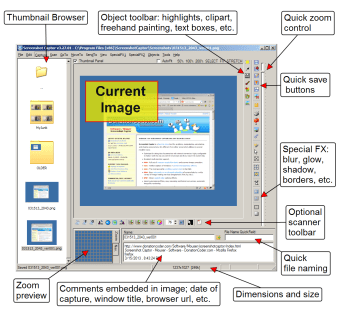
Also, the popular screen capture tool lets you choose from multiple capture methods. These are available in the toolbar at the top left-hand side of the main window. While you can move the toolbar around, it automatically retracts the moment you take the mouse cursor away. Screenshot Captor boasts a range of features only available in high-end screen grabbers and bundles them with various advanced functionalities.
What are the features?
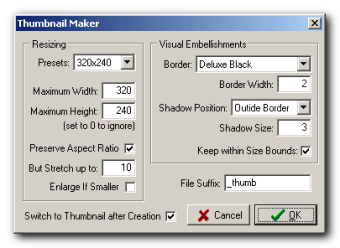
By taking a screenshot, you’re able to access several special effects, filters, and layers available in the application. Some popular choices include borders, blurring, shadows, frames, and more. With this app, you can also generate thumbnails or use the impressive zoom option. Screenshot Captor features extensive taskbar options, so you have more flexibility and control.
The program’s editing screen is easy to navigate. You can count on proper photo organization and management. On the developer’s website, you can find multiple videos, demos, and tutorials to learn more about the features, usage, and editing tools.
While the number of editing features may seem overwhelming, the simple interface makes everything easier to understand. Overall, Screenshot Captor is an excellent choice for people looking to capture the desktop screen for different purposes like creating tutorials, giving presentations, editing photos, etc.
Are there any advanced features?
The powerful screen grabber gives you multiple options for uploading and saving files. This aspect makes it a good choice for organizing captures. For instance, the moment you take a screenshot, the program opens a preview window and lets you accept or discard the image. In case you like the screen recording, you can save the file in one of the available formats. Additionally, you can print, send, and save the file on the clipboard. The program also lets you upload and edit items.
With Screenshot Captor download, you can merge multiple files into a single PDF document. You can save captures as GIFs and make them more interactive and fun. There’s a built-in uploader with various options, so you can upload photos, monitor the queue, and perform other tasks.
The editing tools make Screenshot Captor quite popular among Windows users. The program lets you execute a range of actions with the files. You can choose to apply filters and effects to change the image’s appearance or set priorities for organizing images on the hard drive. Most importantly, new screen captures can fit perfectly into existing snapshots. You can also add captions to the images, making them ideal for social media uploads.
As mentioned earlier, this screen capture tool offers various editing functions. The prominent ones include drawing with paintbrush, custom text, embedded frames, and clipart, etc. The program comes with efficient color enhancement features, including several aspects of hue and saturation. With automatic modes, you can fix existing issues with the images.
Screenshot Captor offers the perfect blend of basic and advanced configuration options. This gives you more control over capturing, recording, organizing, managing. and editing your images.
Last but not least, the screen recorder lets you build up a comprehensive email list to set up multiple actions, from scanning and printing to uploading and sharing files.
What are the alternatives?
For most casual PC users, the cluttered interface is the biggest drawback of using a third-party screen capture program. If you’re looking for something more interactive, you can choose from multiple alternatives. Many of these options offer a more intuitive interface to keep you engaged throughout the process.
For instance, PC Screen Capture is a lightweight, efficient, and simple program. Its clean interface is easy to understand and doesn’t cause any issues with navigation. However, if you choose to go ahead with this app, you’ll have to give up on Screenshot Captor’s advanced editing functionalities.
From an editing perspective, FastStone Capture and Freez Screen Video Capture are also good tools for basic-level changes. While the former lacks configuration options and superior editing features, the latter has a confusing interface.
Considering other options available online, it won’t be wrong to say that Screenshot Captor is a good program to capture your PC screen. The free-to-use screen grabber is an excellent choice for capturing, editing, uploading, and sharing your desktop screen without much hassle or cent spent.
A good choice among free screen grabbers
Screenshot Captor download is way more powerful than other free screen grabbers available online.
With the advanced features, simple interface, and multiple configuration options, the program is the perfect choice to capture your PC’s screen and edit files seamlessly.
Its lightweight characteristic means that your system resources remain optimal and the computer’s hard drive loses little space. Whether you’re using Windows 7 or Windows 10, this program will run smoothly.

.png)